





Chevrolet’s available Head-Up Display needs to be talked about. It doesn’t add horsepower, increase towing capacity, or transform your daily commute. What it does is reduce the number of times you need to glance away from the road, and once you’ve driven with it for a while, that becomes surprisingly difficult to give up.
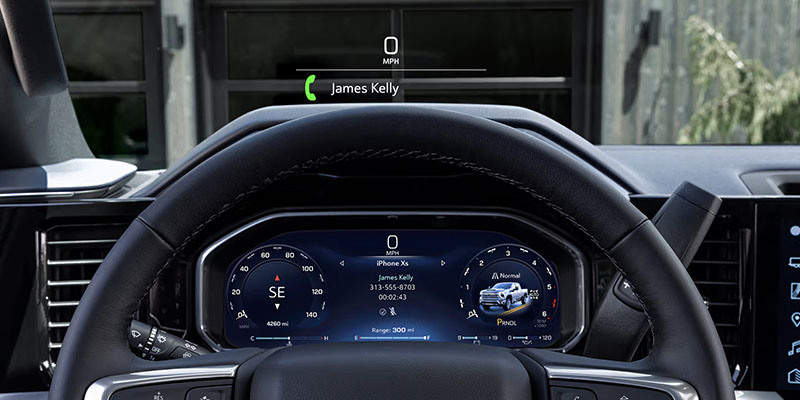
For drivers in Hibbing, MN, where changing weather conditions and long stretches of highway demand constant attention, the Chevy Head-Up Display is one of those features that quickly becomes part of your everyday routine.
Bringing Important Information into Your Line of Sight
The idea behind a Head-Up Display is refreshingly simple. Instead of looking down at the instrument cluster to check your speed or navigation directions, key information is projected directly onto the windshield.
The display appears just above the hood line, creating the impression that the information is floating ahead of the vehicle rather than sitting on a screen inside it. The image is transparent and positioned carefully so it remains easy to read without interfering with your view of the road.
What Can the Chevy Head-Up Display Show?
The information displayed varies by vehicle and configuration, but the goal is always the same: provide the details drivers need most without requiring them to look away from traffic.
Vehicle speed is typically front and center. Turn-by-turn navigation instructions can also appear when using compatible navigation systems, making it easier to follow directions without constantly checking the center touchscreen.
Certain Chevrolet models can also display speed limit information, incoming call notifications, audio information, and select safety alerts connected to driver-assistance systems. Rather than overwhelming the driver with data, the system prioritizes the information that is most useful in the moment.
A Feature That Shines on Long Drives
The value of a Head-Up Display becomes most apparent during highway driving. At 70 mph, even a brief glance away from the road covers a significant amount of distance. Having your speed, navigation instructions, and important alerts directly within your field of view helps reduce distractions and keeps your attention where it belongs.
The feature is equally useful when traveling through unfamiliar areas. Navigation prompts appear naturally within your line of sight, helping you prepare for upcoming turns and exits without shifting focus between multiple displays.
For drivers dealing with Minnesota winters, that added awareness can be especially beneficial when visibility is limited and road conditions change quickly.
Adjusting the Head-Up Display to Fit You
One of the reasons Chevrolet’s Head-Up Display works so well is its flexibility. Drivers can adjust the brightness, choose what information appears on the display, and reposition the image vertically so it aligns comfortably with their seating position. If multiple people regularly drive the same vehicle, these adjustments help ensure the display remains easy to see regardless of height or seating preferences.
Experience Chevrolet Technology for Yourself
The Head-Up Display is one of those features that is difficult to fully appreciate through specifications alone. Once you experience having key driving information presented naturally within your field of view, it quickly feels like something every vehicle should offer.
Drivers throughout Hibbing, MN can visit North Country Chevrolet to explore available Chevrolet models equipped with a Head-Up Display and see firsthand how this technology can make daily driving more intuitive and connected.
Connect with us

- 2026
- 2026 Silverado 1500
- 2026 Traverse
- A/C and Heat
- check engine light
- Chevrolet Technology
- Coolant
- differential
- engine belts
- engine overheating
- HIBBING Chevrolet Dealer
- HIBBING Chevrolet Service
- hibbing gmc dealer
- hibbing gmc service
- HIBBING Used Cars
- North Country Chevrolet GMC Service
- north country gmc
- serpentine belt
- Service
- sierra 1500
- sierra 2500
- sierra 3500
- timing belt
- tire care
- Trims